What's shipped in dbt — May 2026

Last edited on May 20, 2026
It's been a big few months of shipping at dbt. We've got a lot to cover — from the dbt Developer Agent going into preview, to making the upgrade to the dbt Fusion engine self-serve, to new ways to lock down your account security, to quality-of-life improvements for practitioners who live in the IDE. Here's everything that's landed since January.
AI that works with your data, not around it
dbt gets an AI-native developer: the dbt Developer Agent (Preview)
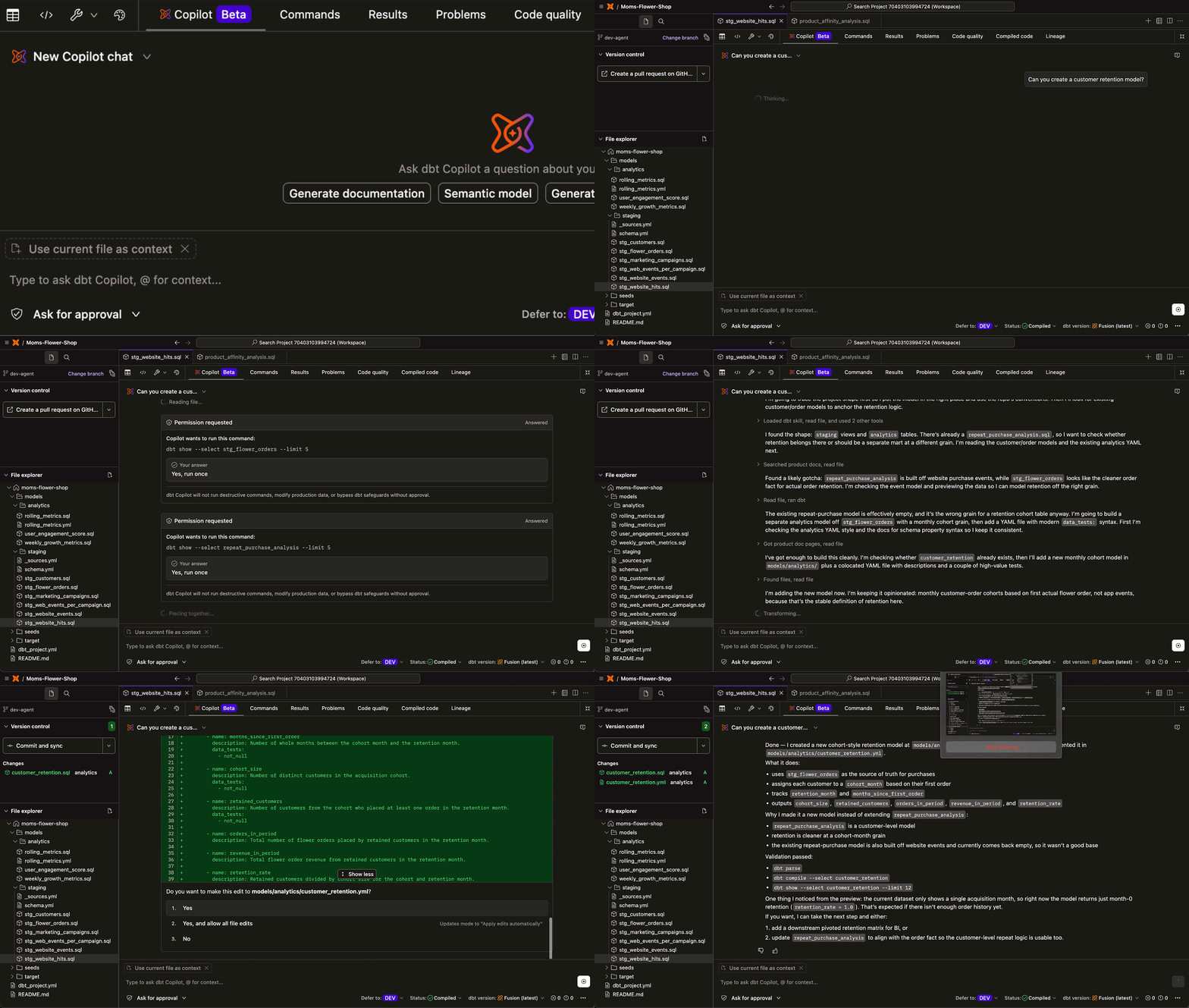
General-purpose coding agents are now everywhere, ready to help anyone code. But the question we kept hearing from teams this year was some version of: can we get an agent that actually works like an analytics engineer? One that understands my whole dbt project? One that can read the graphs, knows the lineage, validates before it touches anything, and helps me build dbt models without breaking anything?
This is why we’ve built the dbt Developer Agent, which is now available in Preview for dbt platform customers with dbt Copilot enabled.
Simply describe the change you want to make — rename a model, add a metric, migrate a stored procedure, fix a failing build — and the agent reads your graph, understands what's upstream and downstream, and drafts the edits across every file that needs to move. SQL, YAML configs, tests, documentation: coordinated changes in one pass. That means less time context-switching between files, fewer broken builds, and data work that ships faster.
→ Read our full announcement blog to learn more
dbt Agent Skills - GA
Earlier this year we released dbt Agent Skills — an open-source repository of best practices that teach generalist coding agents how to think like an analytics engineer that actually understands how to work with dbt projects.
Skills are structured knowledge files that agents load on demand. They encode things like: when to preview data before writing tests, how to structure a semantic model, how to debug a job failure without chasing the wrong root cause. Check out our growing repository of skills by clicking below:
Securely connect dbt to your favorite AI tools (Beta)
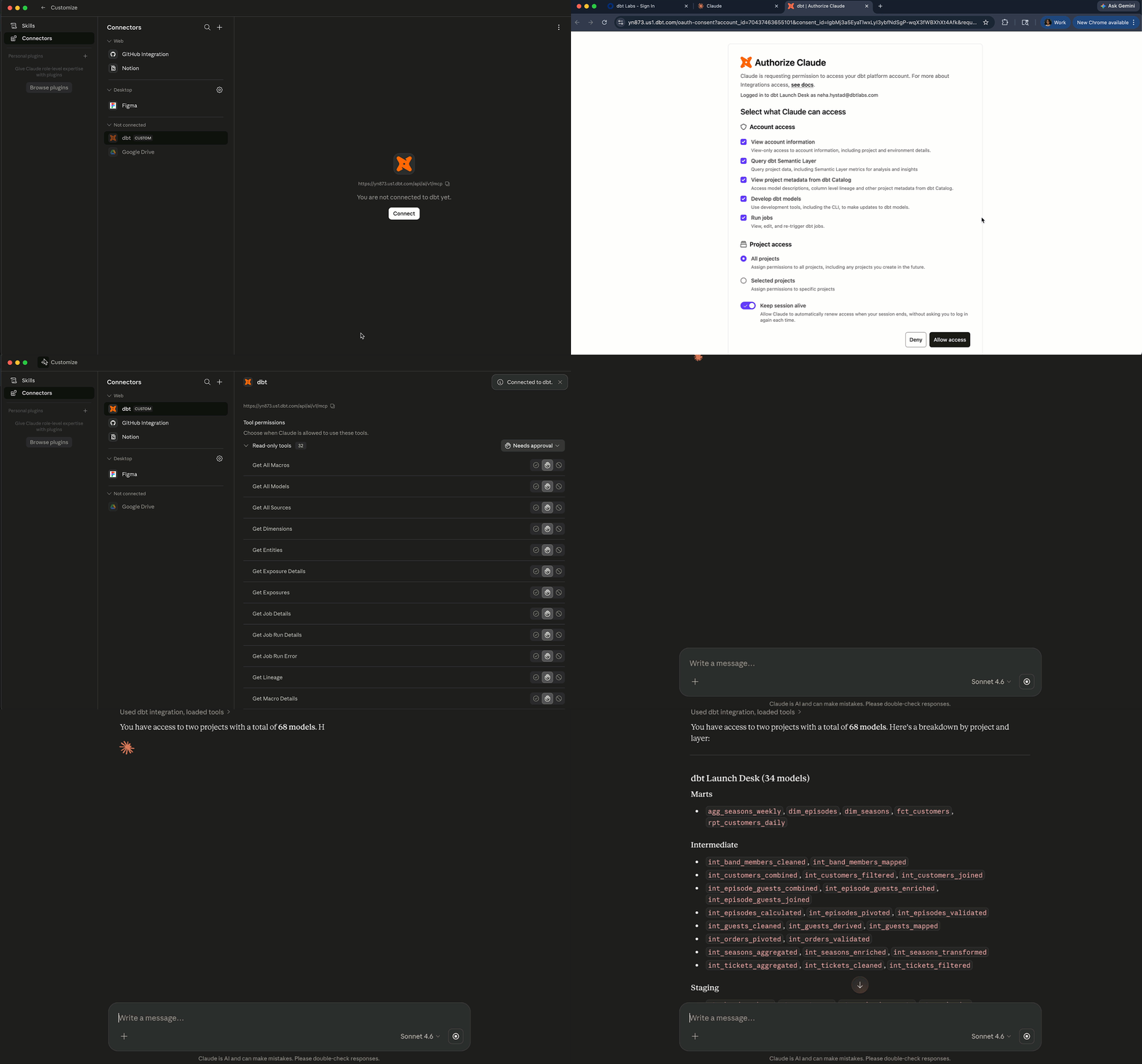
The dbt MCP server now supports OAuth, so you can now connect OAuth-enabled AI tools — Claude, ChatGPT, Glean, and others — to dbt using your existing dbt login. No token management, no configuration hand-off to an admin. Your identity, properly permissioned and secure, in a few clicks.
Remote MCP Server: Admin API support + product docs tools
Two new sets of tools landed in the dbt Remote MCP Server. First, the MCP server now supports Admin API calls — which means AI assistants (Claude, Cursor, etc.) can help troubleshoot job errors directly, not just write queries. Second, the MCP server now includes search_product_docs and get_product_doc_pages tools that pull from docs.getdbt.com in real time, so you get answers grounded in the actual docs rather than training data.
Bring your own Anthropic key
dbt Copilot now supports BYOK (bring your own key) for Anthropic, so teams can power their AI workflows in the dbt platform using their own Anthropic API key — with the usage, cost, and data handling that comes with it.
BYOK is also available for OpenAI and Azure OpenAI, giving teams flexibility to build with the model provider that fits their security, compliance, and cost requirements.
Getting to Fusion just got a lot easier
The big headline on the Fusion side this cycle is that adoption is now self-serve in dbt platform. By accelerating your upgrade to Fusion, you can take advantage of 30x faster parsing time, richer metadata for AI, realtime feedback on SQL as you type, and more. But upgrading your projects manually one-by-one could take hours or days…why not let dbt do the hard parts for you?

Upgrade to Fusion project by project
If you're a dbt platform customer, you can now see which of your projects are eligible for Fusion and move them one at a time, directly from the platform UI. Pick a project, follow the prompts – no ticket, no wait, no overhead.
Fusion migration skill (Beta)
Upgrading to Fusion shouldn't mean fixing conformance errors manually. The Fusion migration skill in the dbt Developer Agent brings an automated approach to getting your projects Fusion-ready, faster:
- It classifies every conformance failure,
- Applies only validated high-confidence fixes automatically, and
- Walks you through medium-confidence changes with clear diffs and your approval.
Blocked issues– those caused by Fusion bugs or framework limitations– are surfaced immediately, with context and a path forward. No wasted effort chasing unfixable errors. The skill re-validates after every fix to handle cascading errors correctly and ends every session with a transparent report. This gives you faster triage, safer fixes, and trust in your upgrade.
How to get started:
- In dbt Studio: Find a job or project that’s ineligible for Fusion. Attempt the Fusion run so you can see the build conformance errors. Studio will surface a new entry point directly in that conformance error experience so you don’t have to dig through error logs. From there, launch the conformance skill and enjoy!
- Via VS Code: The dbt VS Code extension now makes Fusion setup and upgrade significantly easier. When you're ready to upgrade your project, you can run the CLI onboarding flow in the terminal or let an AI agent handle it via the dbt Agent Developer or Cursor, no command line required.
Start your seamless upgrade to the dbt Fusion engine:
More from Fusion this cycle:
Beyond easier adoption, we've invested in making the engine faster and more capable.
- UDF-aware deferral. When you run with --defer and --state, dbt now resolves function() calls from the state manifest — so models that depend on UDFs don't require you to rebuild those functions in your current target first.
- Python UDFs are now supported on Snowflake and BigQuery in the Fusion engine CLI.
- DuckDB support (Beta). Run local dbt projects without a warehouse account. Useful for testing, exploration, and CI scenarios where warehouse costs matter.
- Apache Spark 3.0 (Beta). Fusion engine CLI support for Spark means faster compilation and execution for Spark-based dbt projects – no Python runtime, no subprocess overhead.
For dbt platform customers:
- dbt compare from local dev to CI. You can now compare changes at every stage of your workflow. In local development, the dbt VS Code extension previews how your edits affect your data (added/removed rows, join verification) before you open a PR. Then at the CI stage, dbt compare runs in orchestration on Fusion, giving you model-level diffs as part of your pipeline gate automatically.
- Fusion release tracks give you control over your update cadence: Nightly, Stable, Extended, and Fallback. Choose the release track that matches your team’s stability requirements, risk tolerance and change management processes.
- New projects default to Fusion Stable. New environments in Developer, Starter, and Enterprise accounts now provision on the “Fusion Stable” release track by default – for any supported adapter (Snowflake, Redshift, BigQuery, Databricks).
Want to fast-track your migration to Fusion? Use our quickstart guide.
–> Quickstart guide for Fusion
For dbt builders: Developer experience improvements
This cycle we focused on the things practitioners have been asking for: faster navigation in the IDE, more context at a glance, broader warehouse support for query history, and a meaningfully simplified semantic layer spec.
Studio IDE: search, replace, and command palette
| Search and replace | Command palette |
|---|---|
 |  |
The Studio IDE now has search and replace across your project, a command palette, and the ability to jump to symbols and run IDE configuration commands. These capabilities have been long-requested, and now they're here.
Studio IDE: Better status bar
The status bar now surfaces deferral settings, dbt version, and project status with quicker access to change them.
Model query history: Databricks and Redshift — Beta

Model query history now supports Databricks and Redshift in addition to Snowflake and BigQuery. If you're on either of those warehouses and want to understand query patterns at the model level, this is now available in beta.
New semantic layer YAML spec

The new semantic layer YAML specification introduces several key changes: semantic models are now embedded within model YAML entries (no more managing entries across multiple files), measures are now simple metrics, and frequently-used options are promoted to top-level keys. This is a meaningful spec simplification making it easier for anyone maintaining a semantic layer, and a lower barrier to adoption for those who haven't yet. The new specification is live in dbt Core v1.12 and on the dbt platform “Latest” release track.
→ Migrate to the latest YAML spec
Access to dbt that’s secure, governed and self-serve
We shipped several updates this cycle to make security configuration simpler — and in most cases, self-serve.
Global login — GA


There's now a universal login URL that shows all the accounts you have access to across regions and tenancies, in one place. This is available now for multi-tenant accounts with an account-specific domain; single-tenant support is coming soon.
Self-serve private endpoints — Beta
You can now configure Snowflake PrivateLink endpoints directly in the dbt platform without filing a support ticket. Go to Account settings → Integrations → Private endpoints to request and manage Snowflake PrivateLink endpoints on AWS. If establishing secure connectivity for your dbt setup has been a multi-week support ticket process, that changes now.
Connection profiles — GA

Profiles let you define and manage connections, credentials, and attributes for deployment environments at the project level. dbt automatically creates profiles for your existing projects and environments, so there's nothing to migrate. Useful for teams that want more structured control over how credentials and connections are organized across environments.
Account-level Slack and Microsoft Teams notifications — GA

Job notifications can now be sent to Slack and Teams channels configured at the account level, not just per-job. This makes it easier to set up centralized alerting without touching every job's configuration. Both Slack and Teams notifications are now generally available.
→ Slack notifications · Teams notifications
dbt Core v1.12 is here in Beta
The dbt language is continuing to evolve, and dbt Core v1.12 reflects that momentum. The beta release includes contributions from across the community.
What's in v1.12:
- New on_error config to control whether downstream models run when an upstream model fails. Set on_error: continue on a model to allow downstream nodes to still attempt to execute even when it errors.
- Define project variables in root-level vars.yml to reference them within dbt_project.yml or to keep dbt_project.yml slim.
- New selector method (selector:my_selector) to reference a named selector from selectors.yml inside --select or --exclude to combine with other selectors, graph operators, and set operators.
- Support for the new semantic layer spec simplifies how you define metrics and dimensions by embedding semantic annotations directly alongside each model.
- Expansions of user-defined functions (UDFs)
- Use public third-party PyPI packages in your Python UDFs with the new packages config.
- Write UDF logic in javascript.
- Overloaded UDFs - define multiple functions with the same name but different argument signatures.
- Execute ad hoc database statements (no macro needed) with dbt run-operation --sql
- Improvements to exception handling so error messages are clearer and stack traces are easier to interpret.
- and more coming soon!
→ Learn more in the v1.12 upgrade guide
What’s next
There's always more coming. Stay tuned on our blog for the latest announcements.
In the meantime, the features above are live. If you have questions, find us in #product-updates in the dbt Community Slack. Or contact us to see what dbt can do for your data team.
See us in San Francisco this June
We’re at Snowflake Summit June 1-4 (Booth #2112) and Databricks Data+AI Summit June 15-18 (Booth #430). We'll have live demos, the team on site, and a lot to show you.
Get started in dbt
Join the analytics engineers building data infrastructure that actually scales.
Install dbt Wizard CLI
Get started with an agent purpose-built for analytics engineering. It knows which tool to call, which context to pull, and checks its own work before surfacing anything to you.


